EN
USD
Builda Gcoins

Builda Gcoins

  • Fastly
  • Safety
  • 7*24
ID + Nickname Top-up
  • 300000  Gcoins
    300000 Gcoins
    USD$ 5.87
  • 500000  Gcoins
    500000 Gcoins
    USD$ 9.78
  • 1000000  Gcoins
    1000000 Gcoins
    USD$ 19.56
Product

About Builda

Welcome to Builda, a game maker and social media platform for creating and playing games. Team up with friends to create and play fun games together, draw and animate your favorite characters and oc.
● Collab with friends to create games as a team
● Draw, animate your oc and characters
● Remix games with custom characters, animation editor and more
● Customize your avatar and be whoever you want


How to Topup Builda Gcoins?

  1. Select the desired amount of Builda Gcoins to purchase.
  2. Enter your account information
  3. Click the "Buy Now" button and then select your payment method.
  4. The Builda Gcoins will be credited to your account shortly after payment.


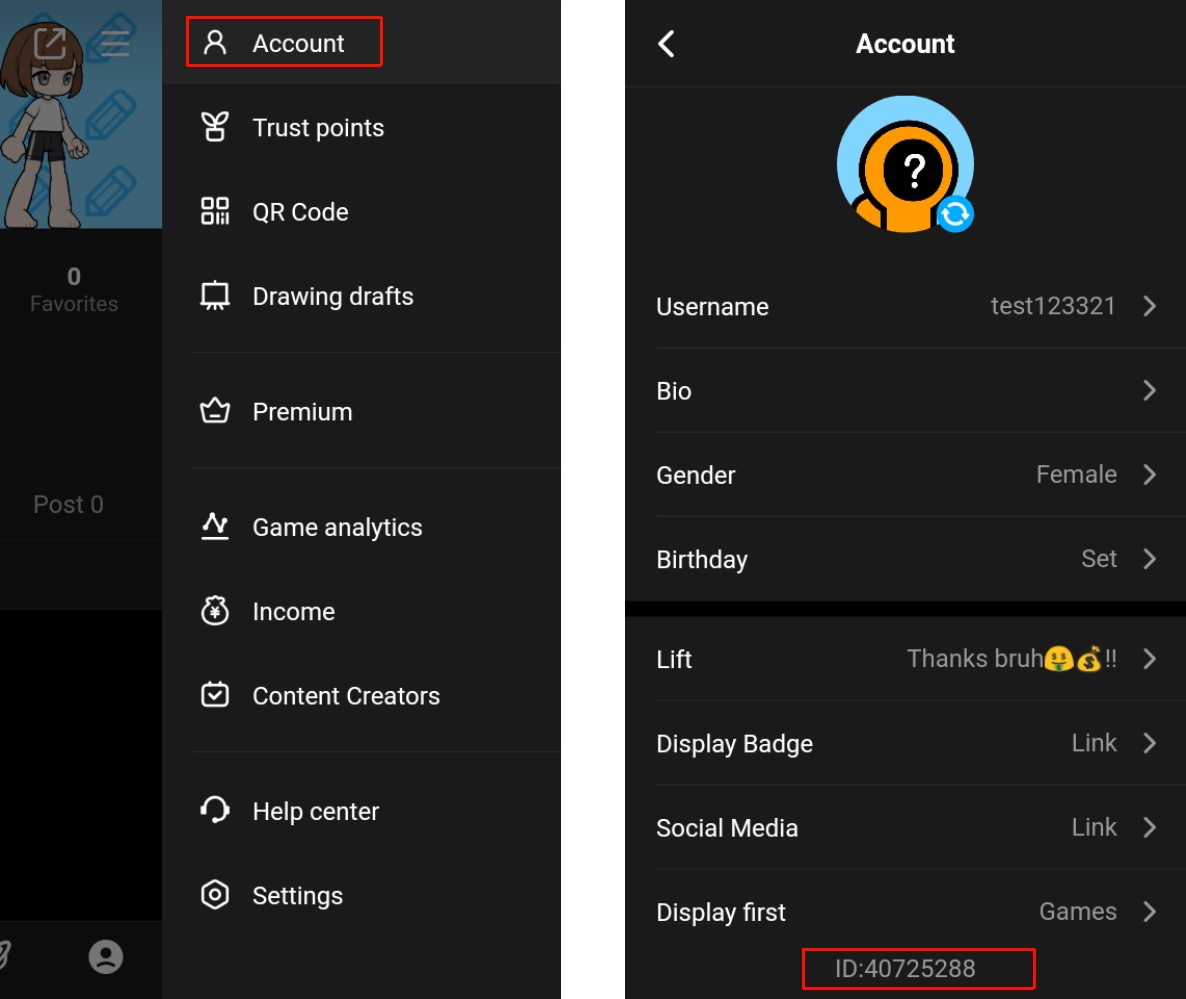
How to find your ID?

  1. Open the Builda App and tap the [ME] tab.
  2. Tap the menu in the top-right corner, then tap Account.
  3. At the very bottom of the Account page, you will find your ID.


Delivery
Contact
Name
Email
Phone
Coupon
(0) Available
Quantity
1
Product (1)
Total
Product

About Builda

Welcome to Builda, a game maker and social media platform for creating and playing games. Team up with friends to create and play fun games together, draw and animate your favorite characters and oc.
● Collab with friends to create games as a team
● Draw, animate your oc and characters
● Remix games with custom characters, animation editor and more
● Customize your avatar and be whoever you want


How to Topup Builda Gcoins?

  1. Select the desired amount of Builda Gcoins to purchase.
  2. Enter your account information
  3. Click the "Buy Now" button and then select your payment method.
  4. The Builda Gcoins will be credited to your account shortly after payment.


How to find your ID?

  1. Open the Builda App and tap the [ME] tab.
  2. Tap the menu in the top-right corner, then tap Account.
  3. At the very bottom of the Account page, you will find your ID.