Mobile Legends (SG) Recharge
- Fastly
- Safety
- 7*24
Singapore ID recharge




*Professional recharge
*Delivery in minutes
*7*24 Hours online
Important Information:
1. 1. This product provides recharge services for Mobile Legends: Bang Bang in Singapore, supports Android and iOS diamond recharges, and requires the player's User ID and Zone ID when recharging.
2. If the profile page displays the Singapore flag  , it means you are located in Singapore.
3. You may stay logged in throughout the transaction, once the top-up is completed, you will receive the Diamonds in your MLBB account.
4. Please enter your User ID correctly to avoid delay on Diamonds top-up.
Product Discription:
Released in 2017 by MonToon, Mobile Legends: Bang Bang is an extremely popular MOBA mobile game. Its real-time 5 on 5 PVP battles are similar to League of Legends. You can fight over three lanes to take the enemy’s tower. With 4 jungle areas, 18 defense towers, 2 Wild Bosses, complete reproductions of classic MOBA maps and full-on 5v5 and human vs human battles, levelling up and gaining experience and gold to unlock heroes has never been more fun. There are 19 heroes and new ones are being added! Choose your favourite heroes and build the perfect team with your friends.
How to top-up Mobile Legends Diamond(iOS and Android ):
1 Select the Diamond denomination.
2 Enter your User ID and Zone ID.
3 Check out and select your payment method.
4 Once payment is made, the Diamonds you purchased will be credited to your Account shortly.
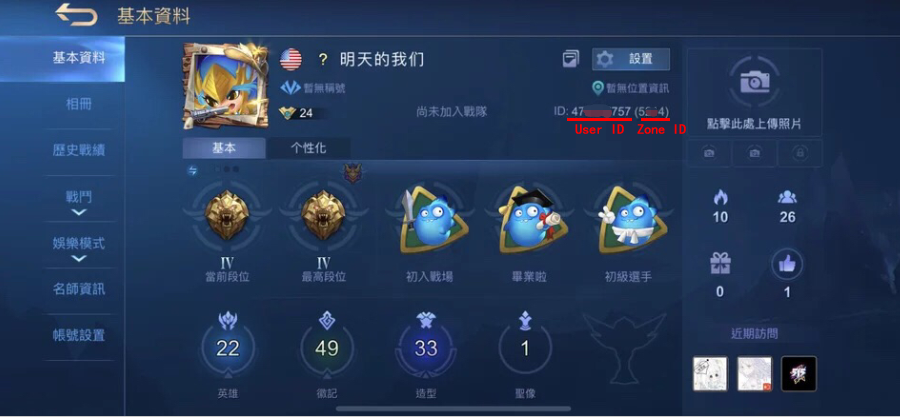
How to find Mobile Legend User ID and Zone ID:
1. Use your account to login the game
2. Click on your avatar in the top-left corner
3. Your Mobile Legend (User ID and Zone ID) will be displayed.(e.g. User ID=“12345678”, ZoneID=“1234”)
About Delivery:
1. We will top-up for your Mobile Legends account left in your order directly.
2. Please login in your account and have a check after finishing the order.
*Professional recharge
*Delivery in minutes
*7*24 Hours online
Important Information:
1. 1. This product provides recharge services for Mobile Legends: Bang Bang in Singapore, supports Android and iOS diamond recharges, and requires the player's User ID and Zone ID when recharging.
2. If the profile page displays the Singapore flag , it means you are located in Singapore.
3. You may stay logged in throughout the transaction, once the top-up is completed, you will receive the Diamonds in your MLBB account.
4. Please enter your User ID correctly to avoid delay on Diamonds top-up.
Product Discription:
Released in 2017 by MonToon, Mobile Legends: Bang Bang is an extremely popular MOBA mobile game. Its real-time 5 on 5 PVP battles are similar to League of Legends. You can fight over three lanes to take the enemy’s tower. With 4 jungle areas, 18 defense towers, 2 Wild Bosses, complete reproductions of classic MOBA maps and full-on 5v5 and human vs human battles, levelling up and gaining experience and gold to unlock heroes has never been more fun. There are 19 heroes and new ones are being added! Choose your favourite heroes and build the perfect team with your friends.
How to top-up Mobile Legends Diamond(iOS and Android ):
1 Select the Diamond denomination.
2 Enter your User ID and Zone ID.
3 Check out and select your payment method.
4 Once payment is made, the Diamonds you purchased will be credited to your Account shortly.
How to find Mobile Legend User ID and Zone ID:
1. Use your account to login the game
2. Click on your avatar in the top-left corner
3. Your Mobile Legend (User ID and Zone ID) will be displayed.(e.g. User ID=“12345678”, ZoneID=“1234”)
About Delivery:
1. We will top-up for your Mobile Legends account left in your order directly.
2. Please login in your account and have a check after finishing the order.


