PUBG Mobile UC (Global) Recharge
- Fastly
- Safety
- 7*24
An original battle royale style game




*Professional recharge
*Delivery in minutes
*7*24 Hours online
Important Note: Not for Japanese / Korean / Taiwan / Vietnam servers.
Product Discription:
PlayerUnknown Battleground (PUBG) Mobile is an original battle royale style game. You can create your own character and join a free-for-all battle online with a team or go solo on the battlefield. In-game purchases such as crate box unlocks weapon skins, clothes, parachutes and many more items!
How to top-up PUBG Mobile UC(iOS and Android):
1 Select the UC denomination.
2 Enter your PUBG Mobile Player ID.
3 Check out and select your payment method.
4 Once payment is made, the PUBG Mobile UC you purchased will be credited to your Free Fire Account shortly.
Important Information:
Only Player ID & Nickname is needed for PUBG Mobile UC top-up.
You may stay logged in throughout the transaction, once the top-up is completed, you will receive the UCs in your PUBG Mobile account.
Please enter your Player ID correctly to avoid delay on UCs top-up.
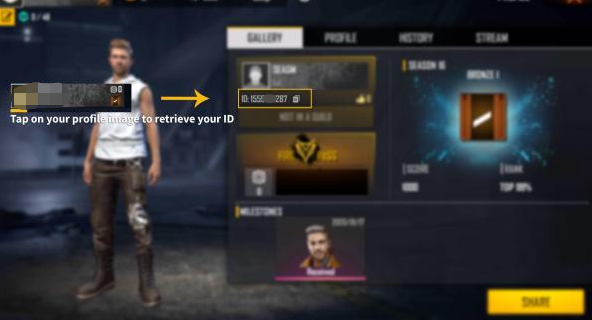
How to find PUBG Mobile Player ID:
Open your player profile.
Your PUBG M Player ID will be displayed.
About Delivery:
1. We will top-up for your Mobile Legends account left in your order directly.
2. Please login in your account and have a check after finishing the order.
*Professional recharge
*Delivery in minutes
*7*24 Hours online
Important Note: Not for Japanese / Korean / Taiwan / Vietnam servers.
Product Discription:
PlayerUnknown Battleground (PUBG) Mobile is an original battle royale style game. You can create your own character and join a free-for-all battle online with a team or go solo on the battlefield. In-game purchases such as crate box unlocks weapon skins, clothes, parachutes and many more items!
How to top-up PUBG Mobile UC(iOS and Android):
1 Select the UC denomination.
2 Enter your PUBG Mobile Player ID.
3 Check out and select your payment method.
4 Once payment is made, the PUBG Mobile UC you purchased will be credited to your Free Fire Account shortly.
Important Information:
Only Player ID & Nickname is needed for PUBG Mobile UC top-up.
You may stay logged in throughout the transaction, once the top-up is completed, you will receive the UCs in your PUBG Mobile account.
Please enter your Player ID correctly to avoid delay on UCs top-up.
How to find PUBG Mobile Player ID:
Open your player profile.
Your PUBG M Player ID will be displayed.
About Delivery:
1. We will top-up for your Mobile Legends account left in your order directly.
2. Please login in your account and have a check after finishing the order.


